
Early access
Welcome. Your school is invited to try Sprilo.
Sprilo is free for you until 31 January 2027, with no card. Your invitation is saved on this device, so take your time: watch the 35-second film, open a real lesson, or see what a teacher's day looks like. Start whenever you're ready.
Primary lessons, ready to teach.
Slides, teacher plans and worksheets across the primary curriculum, from Reception to Year 6. Mark a lesson as taught and your class practises it at home that evening, in the pupil app.
- Free for a month, then £6.99 a month
- Nothing charged until the month ends
- Over 7,000 lessons ready to teach, counting the phonics lessons
- Adapt any lesson at the touch of a button
- SEND support in the teacher plans
- Spiral curriculum that builds year on year
- The new national curriculum: we intend to update every lesson for it, due for first teaching in September 2028, at no extra cost to subscribers
Sprilo in 35 seconds.
What the film shows
- The library: over 7,000 lessons, every subject, Reception to Year 6, counting the phonics lessons.
- A Year 5 maths lesson, Long multiplication: 17 slides, a teacher plan and a worksheet.
- The teacher's Today page, their timetable for the day: they tap "Taught it" on maths and then reading, and each lesson's practice is set to go live at 15:30.
- At home, Olivia opens the pupil app, works out 23 × 142 = 3,266 with Octavia, and completes the mission.
- By the morning the class register on Your class shows each pupil's score on every lesson, and who is stuck.
- Sprilo Studio: a Year 5 maths lesson adapted for more support and easier reading in under a minute, keeping its own slides and pictures, with a teacher plan for the teacher to check.
- Start your free month, then £6.99 a month per teacher.
Teach it today. They practise it tonight.
Choose a lesson
Find it by year, subject or topic. Each lesson has slides, a teacher plan and a worksheet or activity.
Teach it, then tap "Taught"
One tap on your Today page sets the matching practice for your class.
They practise at home
About five minutes in the pupil app, with the same host as in class. By the morning you can see who got it and who is stuck.
Everything for the lesson, nothing left to finish.
Lessons follow the same seven steps, from Reception to Year 6: recap, hook, teach, practise together, practise alone, check and review. Move year group and you already know the shape.
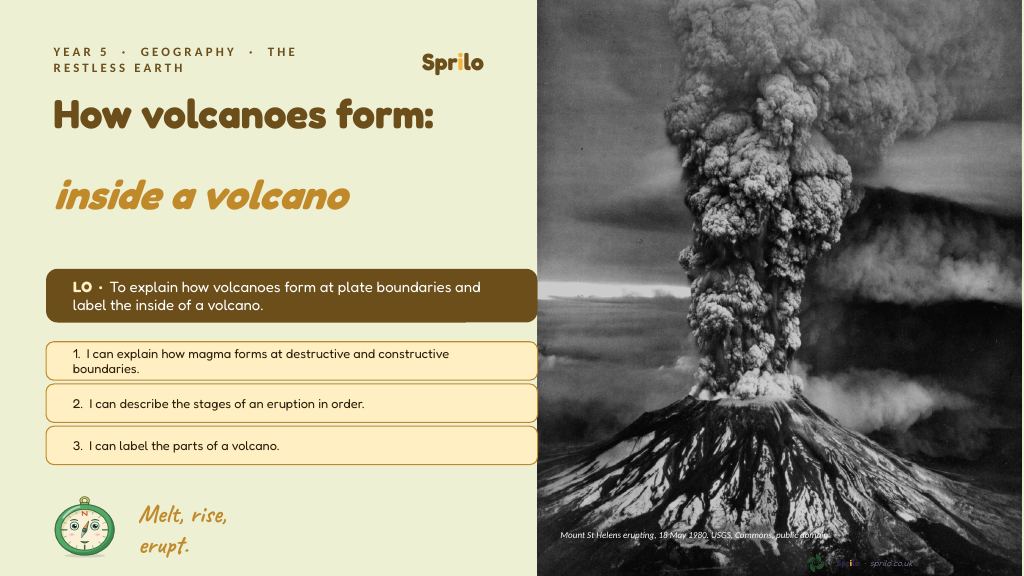
Slides
Ready to teach from, and yours to adapt in PowerPoint.
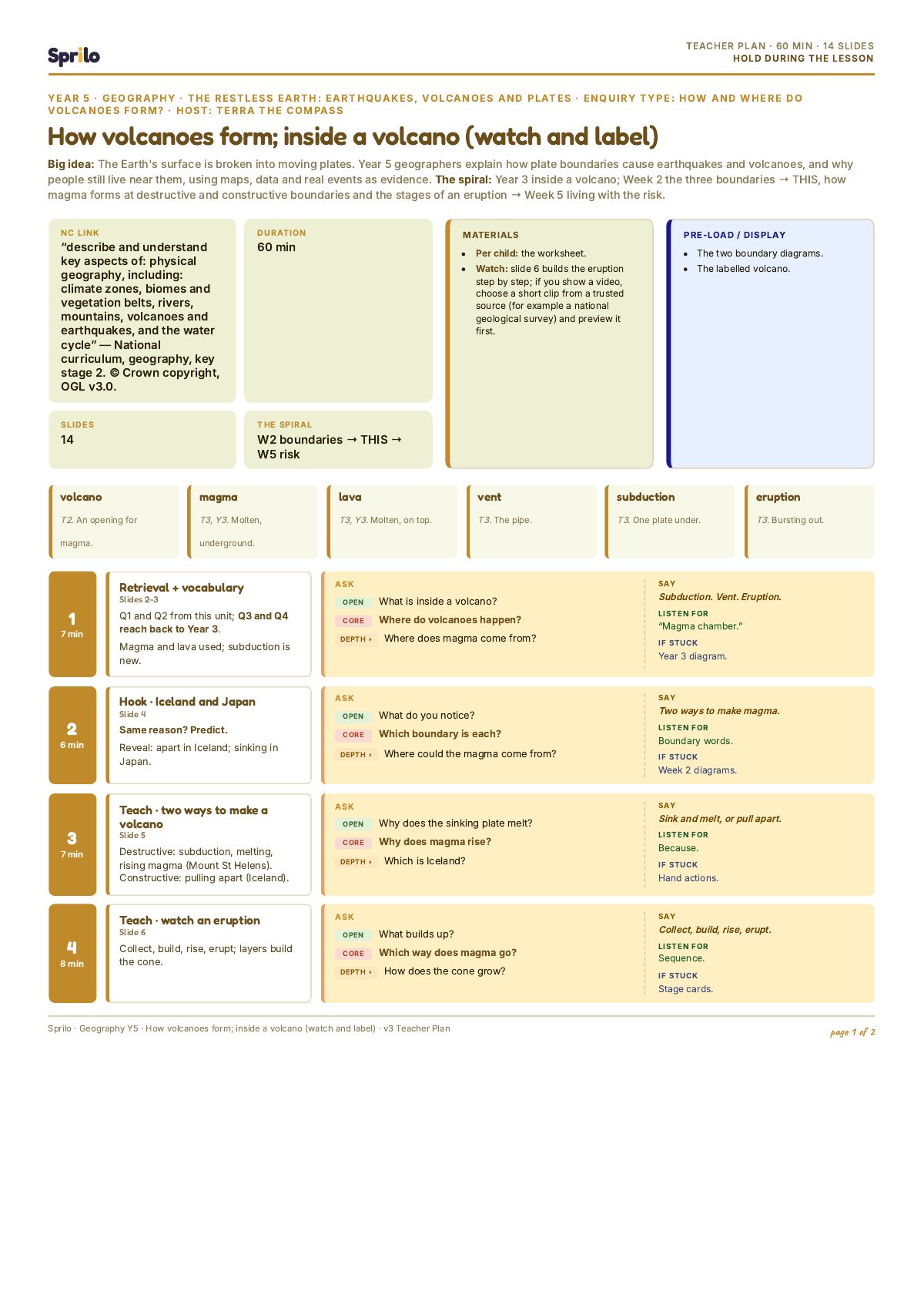
A teacher plan
Timings, key questions, key vocabulary and SEND support, planned in from the start.
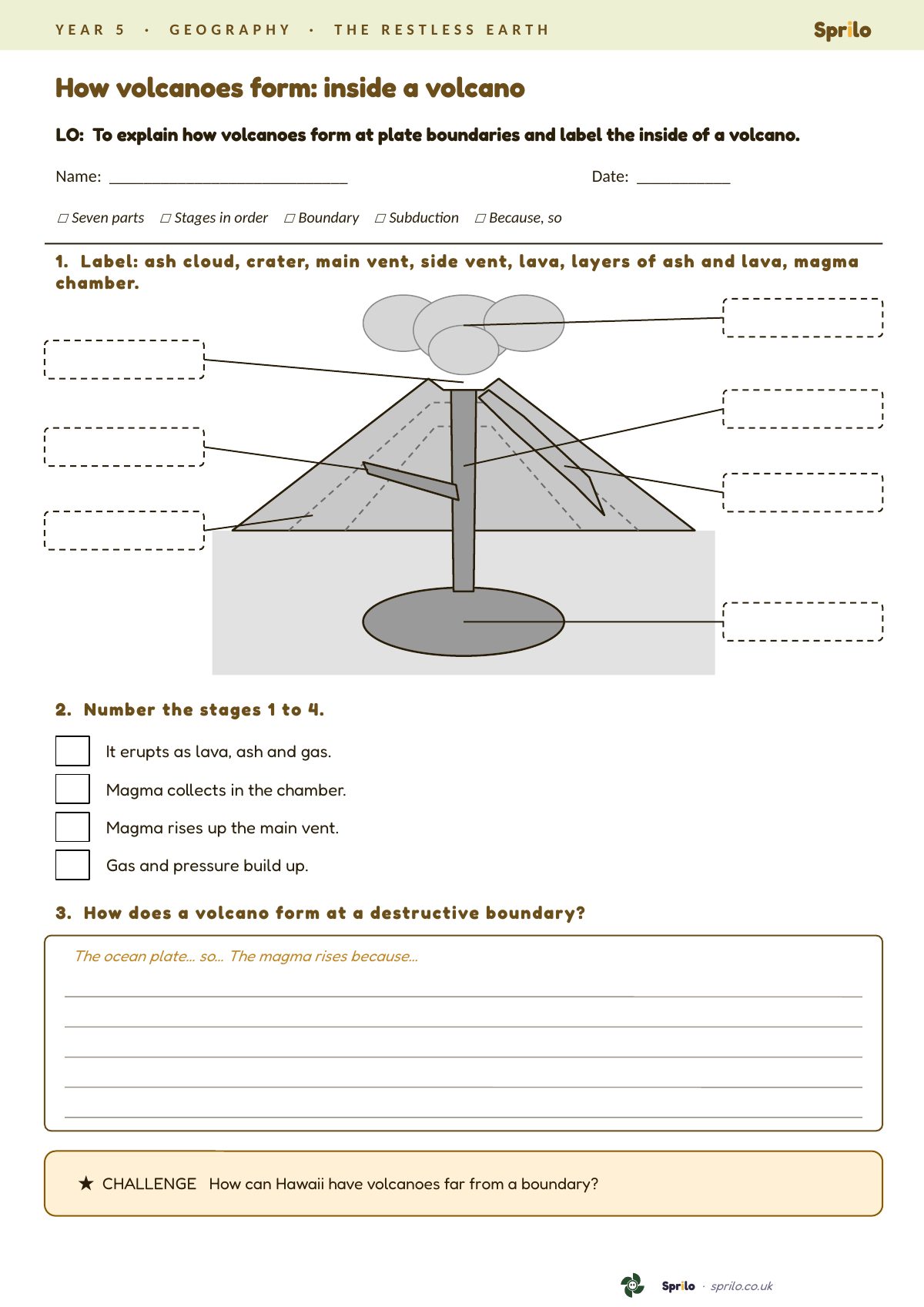
A worksheet
Ready to print, for when pupils work on their own. PE lessons often use a hall activity instead.
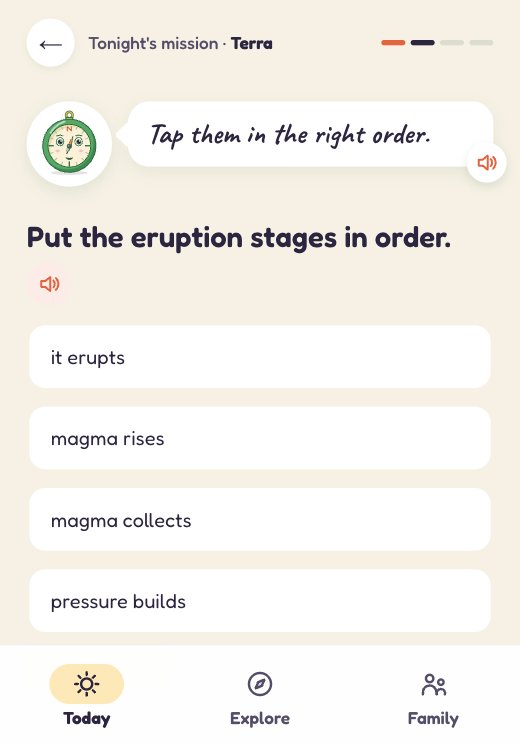
Practice at home
For most lessons, a short practice in the pupil app. Children join with a class code: no accounts, no passwords.
Made by a serving primary teacher, in their own time.
Sprilo is made by Jack, a Year 5 class teacher in a London primary school. He built it in the evenings and at weekends because planning a whole week of lessons across every subject took longer than teaching it, and the resources he could find were patchy, expensive or both. Sprilo is his own project, separate from the school where he works. Every lesson in the library follows the same routine: a recap, a hook, teaching, practice together and alone, a check and a review. If you have a question, or a lesson that could be better, email Jack at hello@sprilo.co.uk. He reads every message.
 Sprilo Studio
Make any lesson fit your class.
Pick any Sprilo lesson and say what your class needs. In under a minute Studio edits it for you: the lesson's own slides and pictures, reworded, with extra slides where they help, the worksheet and a teacher plan.
- Easier to read
- More support (SEND)
- EAL
- Stretch
- Your local area
- A shorter slot
- It keeps the lesson's own slides. Every picture, diagram and maths visual stays.
- Slides, worksheet and teacher plan. PowerPoint, ready to edit.
- You check it first. Studio is for teachers. Children never talk to AI; a Studio question reaches them only after you approve it.
- 10 lessons in the free month, 30 a month on a plan. Included in the price.
Your local area“Our school is in Leeds. The town hall and the market are Victorian.”
Studio's version
The same lesson, set in Leeds
- A new slide on Leeds Town Hall and the market
- The timeline and the homework point to Leeds
- Every slide, photograph and date kept
Every subject has its own friendly host.
The same character hosts a subject from Reception to Year 6, in class and in the pupil app. Octavia leads every maths lesson, from counting to five to solving equations, and Paige the Bookworm leads a daily reading lesson on real books and great classics.
 Maths
Hosted by Octavia
Reception to Year 6
92% ready
 Writing
Hosted by Sage
Reception to Year 6
All lessons ready
 Reading
Hosted by Paige
Reception to Year 6
All lessons ready
 Science
Hosted by Nova
Reception to Year 6
70% ready
 History
Hosted by Tempo
Reception to Year 6
All lessons ready
 Geography
Hosted by Terra
Reception to Year 6
86% ready
 RE
Hosted by Lumi
Reception to Year 6
All lessons ready
 PSHE
Hosted by Clover
Reception to Year 6
All lessons ready
 PE
Hosted by Dash
Reception to Year 6
All lessons ready
 Music
Hosted by Melody
Reception to Year 6
All lessons ready
 Art & Design
Hosted by Pip
Reception to Year 6
23% ready
 Design Technology
Hosted by Rivet
Year 1 to Year 6
All lessons ready
 Computing
Hosted by Byte
Year 1 to Year 6
All lessons ready
 French
Hosted by Coco
Year 3 to Year 6
All lessons ready
Spanish
Hosted by Coco
Year 3 to Year 6
All lessons ready
What teachers say.
Every quote is published with the teacher's written permission: first names only, and a school type rather than a school name unless the school asked to be named.
£6.99 a month. Per teacher. That's it.
One price, with everything included. Try it free for a month first: you add a card to start, and nothing is charged until the month ends. Cancel before then and you pay nothing.
Sprilo for teachers
£6.99a month
or £69 a year, which saves £14.88
Founding price. The first 1,500 teachers to start a plan by 31 March 2027 keep £6.99 a month or £69 a year, including any VAT, fixed for three years from the day their plan starts.
- Every lesson in the library, and new ones as they're added
- The pupil app for your class, up to 40 pupils
- Sprilo Studio: make any lesson fit your class (10 lessons in the free month, 30 a month on a plan)
- Mark a lesson as taught, practice that evening, results as pupils finish (most lessons)
- We intend to update every lesson for the new national curriculum, due for first teaching in September 2028, at no extra cost to subscribers
- Cancel any time
No VAT is charged.
For a whole school
Priced per teacher place, on one annual invoice. The more teachers, the less each place costs. No onboarding session, nothing else to buy.
| 1 to 5 places | £69 a place |
|---|---|
| 6 to 12 places | £62 a place |
| 13 to 25 places | £55 a place |
| 26 places or more | £49 a place |
A one-form-entry school with seven teachers: £434 a year. Two-form entry with fourteen: £770 a year. No VAT is charged. Trusts of five or more schools: let's talk about a partnership.
A one-page summary for your headOr email hello@sprilo.co.uk
Every subject, for less than the big names.
-
Sprilo
£6.99a month, per teacher
Every subject from Reception to Year 6, the pupil app and every new lesson. Or £69 a year.
-
Twinkl Ultimate
£10.99a month, per teacher, from
Twinkl's starting price for the membership that unlocks all of Twinkl.
-
Kapow Primary Complete
£1,450a year plus VAT, per school
For a school of 151 to 300 pupils. Foundation subjects only: no maths, English or phonics.
A one-form-entry school with seven teachers pays £434 a year on a whole-school licence, with every subject included.
Prices from each company's own website on 7 October 2026. Twinkl and Kapow Primary are not connected with Sprilo.
Good to know.
What's included in the free month?
Every lesson page, every plan on screen and the pupil app, with no limits, and up to 10 lessons from Sprilo Studio. Most lessons come with practice for the evening they are taught. You can download up to 60 files a day and 300 in total, and get a whole day's worksheets in one PDF for 10 school days; downloading a whole unit at once comes with a subscription.
Do I need a card for the free month?
Yes. You add a card when you sign up, on the secure page of Stripe, our payment provider. We never see the card number.
Nothing is charged during the month, and we email you before it ends. Cancel from your account page before then and you pay nothing. Otherwise Sprilo carries on at £6.99 a month, or £69 a year if you chose that.
How do I start?
While we work with the first schools, the free month is by invitation. Email hello@sprilo.co.uk and we'll send you a code. Some invitation trials start without a card; if yours does, the sign-up page says so.
Which subjects are ready?
Every subject is ready, from Reception to Year 6. Computing and Design and technology start in Year 1, and French and Spanish in Year 3.
Does it follow the national curriculum?
Yes. Every unit is planned against the national curriculum for England, and Reception against the EYFS framework, half-term by half-term.
Maths follows the NCETM's published curriculum progression and the DfE's ready-to-progress criteria. NCETM is not affiliated with Sprilo and does not endorse it. See the maths unit map.
Do pupils need accounts?
No. Children join with a class code and tap their name. Sprilo keeps a first name and surname initial, and which practices they did. No emails, no passwords and no photographs.
Can I change the lessons?
Yes. Slides download as editable PowerPoint files, so you can adapt them for your class. Each file carries a small licence line with your name and school.
Or let Sprilo Studio draft your version: see the next question.
What is Sprilo Studio?
Studio makes any Sprilo lesson fit your class. Pick a lesson, tick what your class needs (easier to read, more support, EAL, stretch, your local area or a shorter slot) and in under a minute Studio edits the lesson's own slides and worksheet, keeping every picture and diagram, adds extra slides where your class needs them, and writes a teacher plan. It can also start a new lesson in the Sprilo shape. See a real example.
Studio uses Claude, an AI model made by Anthropic, so you check every part before you teach it. It is for teachers only: children never talk to AI in Sprilo, and a Studio question reaches them only after you approve it. Studio drafts lessons in 14 subjects; it does not draft Reading lessons, which are built around real books. Please don't type pupils' names into it.
How do I tell you what's wrong, or what you'd like?
Use the Feedback button in the corner of any page, or email hello@sprilo.co.uk. We read every message.
Try Sprilo free for a month.
Nothing is charged until the month ends, and you can cancel any time. Look around the library and the pupil app first if you like.